Picture yourself editing a job post. The title field sits on one side of the page, a preview of the post sits on the other and the Save button sits above both. Because all three work on the same draft, you expect the preview to follow when you change the title, and you expect Save to send the version you are looking at. To you, all of this is one piece of work, but inside the page the field, the preview and the button are separate components, and where their shared draft lives decides two things: whether those components stay in step, and whether a small edit in one corner makes the whole page do work it did not need to do.
That question kept coming back while I worked on Navigos Talent One, a recruitment product built by a team, whose modules include job posting, candidate search, campaign tools and landing-page editing. Its long editing flows and its multilingual interface meant the frontend had to answer, again and again, which part of the interface owns the state several components share.
My answer was to treat a working draft like a notebook left open on the desk for one task. Everyone working on that task reads from the same pages and writes on them, and nobody has to pass notes from hand to hand to stay current. I built createContextState to give a page or a feature that kind of notebook: a shared store of its own, with ways for each component to read only the part it needs. The pattern is published in @khanglvm/react, and the source repository holds the implementation and guides.

In the job post editor, each piece of the pattern handles one need that comes up while you edit. A Provider marks which part of the page owns the draft, selectors let each component watch only the value it shows, a snapshot getter lets an action read the newest draft at the moment it runs, and the setter can hand back a way to undo a change when its request to the server fails.
When the title and the preview need to agree
Before reaching for a shared store, I ask who owns the value. A field that only one component uses can stay inside that component, data fetched from a server can stay in a cache such as TanStack Query, and state that belongs in a shareable link should live in the URL. The job draft sits between those cases, because several parts of one page use it while nothing outside the page needs it. So a Provider wraps the part of the interface that owns the draft, and the form, the preview and the Save button all reach the same store without the title being passed down through layout components that have nothing to do with it.

When you leave the editor for another page
Where the Provider sits also decides what survives when someone moves elsewhere. The interface language and the selected company may need to last across navigation, so they belong above individual pages, while a drawer used inside one editor can stay with that editor and close down with it. Placing the Provider at the matching boundary turns the lifetime of each piece of state into a deliberate choice.
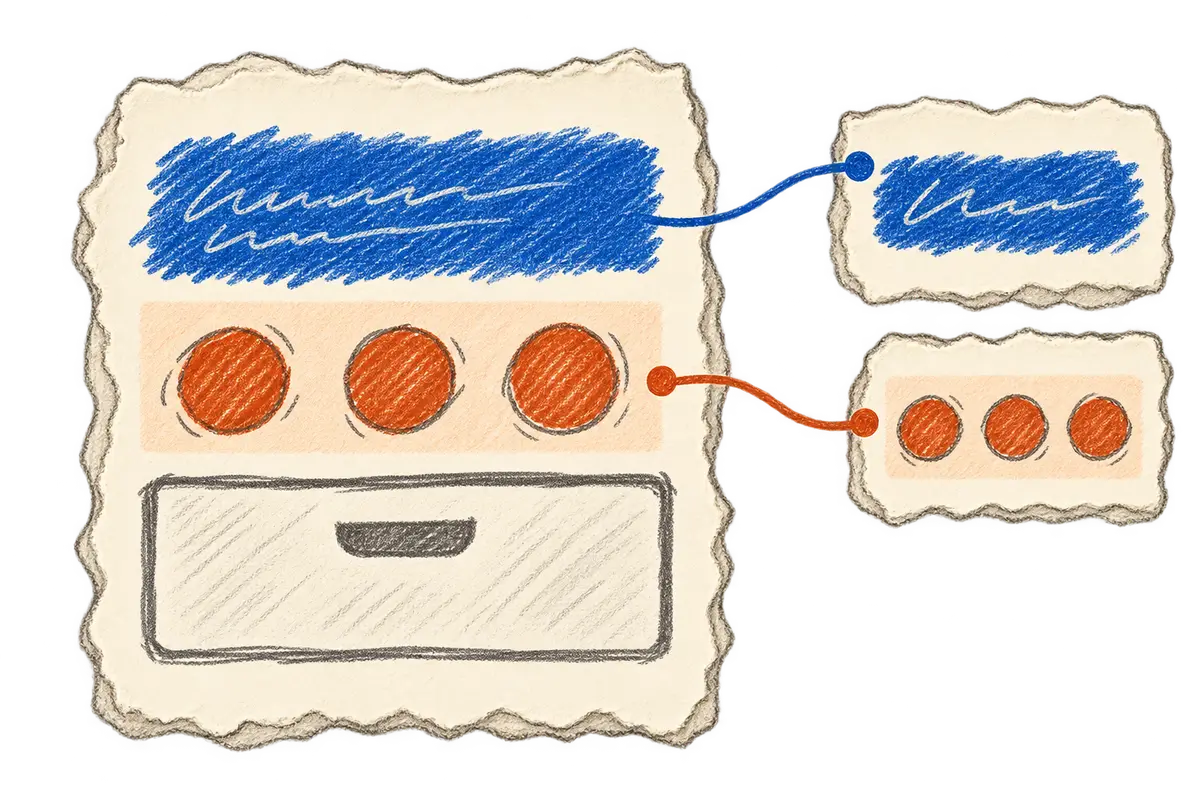
When something else on the page changes
Sharing one store would be costly if every change woke up every component, which is why each part follows only what it renders. A counter of selected rows needs the number of selected rows and has no reason to redraw when someone opens an unrelated drawer, in the same way that the step indicator in the job post editor only needs to know which step you are on. A selector lets a component subscribe to the particular value it renders, so an unrelated change in the same store does not trigger a render through that subscription.
When Save has to wait for validation
The Save button needs a different kind of access, because after you press it, an asynchronous handler may wait for validation while you keep editing, and a value captured at the click can already be out of date by the time validation finishes. Reading a fresh snapshot after that wait lets the button save the latest draft, which is the one you expected it to save in the first place.
When a request to the server fails
Some actions update the screen before the server confirms them, so a failed request needs a way back to what the user saw before. The setter can return a function that rolls the update back, and for frequent edits that never need rollback, that extra work can be switched off.
Those moments are what shaped the pattern: a place that owns the state, a way for each component to follow only the data it uses, and a way to read the latest draft when an action needs it. The technical notes below show how I use it, with example code in place of private product code.
React examples and implementation notes
The factory combines React Context, useSyncExternalStore and Immer: Context locates the nearest store, components subscribe to selected snapshots through useSyncExternalStore, and Immer handles nested draft updates along with the inverse patches used for optional rollback. The package documents React 18 and 19 support and ships ES modules with TypeScript declarations.
npm install @khanglvm/reactSet up a page-owned draft
This example keeps a job draft under one Provider, the same setup as the editor described above. The api calls stand in for the application's own save behavior.
import { createContextState } from "@khanglvm/react"

type JobDraftState = {
  step: "details" | "requirements" | "preview"
  draft: {
    title: string
    skills: string[]
  }
  saving: boolean
  error?: string
}

export const {
  Provider: JobDraftStateProvider,
  useContextStateValue: useJobDraftValue,
  useSetContextState: useSetJobDraftState,
  useStateSnapshotGetter: useJobDraftSnapshot,
} = createContextState<JobDraftState>("JobDraft")

export function JobDraftPage({ children }: { children: React.ReactNode }) {
  return (
    <JobDraftStateProvider
      initialState={{
        step: "details",
        draft: { title: "", skills: [] },
        saving: false,
      }}
    >
      {children}
    </JobDraftStateProvider>
  )
}

export function StepIndicator() {
  const step = useJobDraftValue((state) => state.step)
  return <span>{step}</span>
}

export function AddSkillButton({ skill }: { skill: string }) {
  const setState = useSetJobDraftState(false)

  return (
    <button
      onClick={() => {
        setState((draft) => {
          draft.draft.skills.push(skill)
        })
      }}
    >
      Add skill
    </button>
  )
}

export function SaveDraftButton() {
  const setState = useSetJobDraftState()
  const getSnapshot = useJobDraftSnapshot()

  async function saveDraft() {
    const revert = setState((draft) => {
      draft.saving = true
      draft.error = undefined
    })

    try {
      await api.saveDraft(getSnapshot((state) => state.draft))

      setState((draft) => {
        draft.saving = false
      })
    } catch {
      revert()

      setState((draft) => {
        draft.error = "Could not save the draft."
      })
    }
  }

  return <button onClick={saveDraft}>Save</button>
}
I rename the returned hooks after the state they belong to, so a consumer imports a job-draft hook instead of a generic state hook.
Choose the access a component needs
| API | Purpose |
|---|---|
Provider |
Own the store for a subtree. |
useContextState(selector) |
Read selected state with access to its setter and snapshot getter. |
useContextStateValue(selector) |
Subscribe to the value the component renders. |
useSetContextState(enableRevert?) |
Update state without subscribing. |
useStateSnapshotGetter() |
Read the latest state inside an event or asynchronous handler. |
withContextProvider(component, config) |
Attach a Provider and map props into initial state. |
useSetPostFlush() |
Run expensive derived work after a batch of mutations. |
On a search page, for example, the filter bar can read filters while a toolbar reads the selection, and an export action can take a snapshot of the current filters when someone clicks it. A language value belongs higher, in app-shell state, so translated labels can change without resetting the page's form progress or closing its open drawers.
Selectors should derive their result from state alone, because time, randomness or network calls can change independently of the selected state and make the subscription unreliable. The implementation caches structurally equal selector results so their references can stay stable.
Read after an asynchronous wait
A snapshot getter is useful when validation finishes after the user has made another edit:
function SaveButton() {
  const getEditorSnapshot = useEditorSnapshot()

  async function save() {
    await api.validate()

    const latestDraft = getEditorSnapshot((state) => state.draft)
    await api.save(latestDraft)
  }

  return <button onClick={save}>Save</button>
}
That read does not subscribe to future changes, so a value the component renders still needs a selector hook. Event handlers, keyboard shortcuts and debounced saves can use the getter whenever they need the current value at the moment they act.
Roll back an optimistic update
The setter can retain the inverse patches needed to revert an update after a failed request:
async function archiveCandidate(id: string) {
  const revert = setCandidatesState((draft) => {
    const candidate = draft.itemsById[id]
    candidate.archived = true
  })

  try {
    await api.archiveCandidate(id)
  } catch {
    revert()
  }
}
For frequent builder edits, useSetBuilderState(false) keeps draft updates while skipping rollback patch generation. Several mutations can also flush together through a queued microtask, and a post-flush hook is useful when an editor needs to recompute expensive derived state once after that batch.
Keep lifetime and server rendering explicit
Each Provider creates its own store, so sharing a factory does not share state between Providers or between server requests. Server and client initial values still need to agree for hydration.
App-shell state can survive ordinary client-side route changes, while feature state survives only as long as its owning Provider stays mounted. URL-backed state can use a separate query-parameter store with the same subscription approach; it does not become URL-backed simply by entering this store.
The package also includes typed translations, browser events and helpers for props and children, and the state guide covers the API and its limits. Redux, Zustand and Jotai remain alternatives with different tools and state models; an existing team workflow may be a good reason to keep them.
I reach for this pattern when several components share a working draft and its owner follows the page or feature tree, while a small component can still keep its own state. What I want from it is for every part of a page to agree about the work in front of the user, inside an ownership boundary the rest of the team can follow, so if you try something similar, start by asking who owns the draft before deciding where to store it.